

Although the early Raspberry Pi units didn’t rank too high on the performance front, you’d often find folks relying on it for entry-level server tasks. Now, I’m well-aware that the Raspberry Pi wasn’t designed for home lab experiments, but these pint-sized boards were (and still are) more than enough to handle a couple of QoL containers, run cheap non-transcoding media servers, and even support Home Assistant setups involving a handful of devices.
But between outdated hardware and price spikes, the Raspberry Pi’s utility in beginner-friendly server tasks has slowly gone down over the last couple of years. In the meantime, Intel’s N100 processor has become the de-facto king of budget home labs – to the point where it’s cheaper to grab a mini-PC powered by this energy-efficient CPU instead of throwing money on a mainline Raspberry Pi single-board computer.
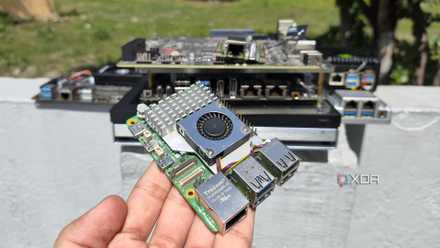
4 Raspberry Pi projects I abandoned after realizing sub-$150 mini PCs run them all better
After all, cheap mini-PCs crush Raspberry Pi SBCs on the performance and OS compatibility fronts
The Intel N100 runs circles around the RPi in terms of processing capabilities
After all, the RPi 5’s hardware was outdated by the time it was released

One of my biggest complaints with the newer Raspberry Pi boards is their weak hardware, with the RPi 5 packing a CPU that had already become a few years old by the time it hit the shelves. But back then, the uber-popular SBC family didn’t have anything to fear about, as you couldn’t find a tiny system that offered the same level of performance and package support as the RPi series – even if rival boards had started upping their hardware’s capabilities.
But what really flipped the equation on its head was the Intel N100. While it is a few years old as of writing this article, it’s still a reliable processor for cheap DIY server projects, especially when compared to the Raspberry Pi’s specs. For my Proxmox experiments, Intel N100 mini-PCs (as well as SBCs and compute modules) have managed to run a few VMs, including those with full-fledged desktop environments. Simultaneously, if I may add. Heck, they can even run a bunch of LXCs alongside simple CLI virtual machines, which is more than what I can say about the Raspberry Pi.
Likewise, the N100 is resilient for hardcore Home Assistant setups involving dozens of automation chains, smart gizmos, and integrations. Of course, a Raspberry Pi 5 could serve as a decent HASS unit, but you’re bound to run into performance issues as your arsenal of smart home devices scales up. Likewise, you can host significantly more FOSS via containerization apps on N100-powered systems, and the same applies to the N100’s utility in media servers, especially once you include its Quick Sync capabilities.
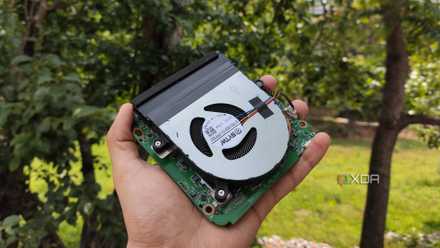
I used an Intel N100 mini-PC as a standalone Proxmox node – it went really well
Besides being able to self-host multiple containers, it can even run a few VMs
Its transcoding provisions are just as incredible
Although you can deploy a bunch of media server tools on the Raspberry Pi, its utility takes a steep drop when you need to transcode videos. Sure, the mainline RPi systems can handle 1080p transcoding without buckling under pressure, but when you need multiple 4K streams, these tiny boards are far from ideal.
But thanks to the Quick Sync functionality in the N100’s iGPU, the budget-friendly processor is a beast at 4K transcoding tasks. I recently turned my N100-powered LattePanda Mu module into a Jellyfin server (one that runs a couple of other LXCs on Proxmox), and it was able to handle four 4K streams – enough to replace my old GPU setup.
The Raspberry Pi can’t function as a primary NAS, either

Since we’re on the subject of media archival tasks, turning a Raspberry Pi into a makeshift backup server used to be a fairly popular idea back in the day. But unless you opt for a dedicated setup involving SATA HATs, it’s not worth building a dedicated Network-Attached Storage server with a Raspberry Pi and external drives. And even with such a HAT, the RPi starts to throttle once you toss more than three drives.
Pair that with its slow 1G Ethernet connection and the fact that you can’t harness TrueNAS or Unraid, and it’s a terrible option for your everyday storage server. Don’t get me wrong: it’s still a solid secondary server, but I can’t recommend picking up these expensive SBCs (and I’ll go over that in a minute) in a 3-2-1 backup environment. In the end, it’s always better to opt for an N100 rig if you want to save a few bucks, as it can accommodate more drives and work well with most NAS distros. In fact, I’ve tinkered with enough mini-PC NAS hybrids and dedicated storage servers that bear this processor to know it’s pretty solid for budget-friendly backup and data archival rigs.
Software compatibility is another front where the N100 dominates the Raspberry Pi
Even with workarounds, the Raspberry Pi can’t run most server platforms
The Intel N100 also knocks the Raspberry Pi family out of the park when it comes to software support, which is pretty ironic, considering the RPi’s superior compatibility with different operating systems and packages is what made it so popular to begin with. But at the end of the day, the RPi SBCs are based on the ARM architecture, and there are dozens of distros, home server platforms, and tinkering utilities that don’t support anything other than x86 (or, for pedantic folks, x86-64) systems.
Sure, it’s still possible to use good ol’ Canonical MicroCloud with the Raspberry Pi by installing it on Ubuntu Server’s ARM image. Likewise, it’s possible to get OpenMediaVault alongside a handful of containerization platforms up and running on high-end RPi SBCs. But everything from Proxmox to TrueNAS requires a lot of workarounds to run on Raspberry Pi, many of which often result in broken Ethernet drivers, limited storage options, and unusable GPIO headers.
In contrast, Intel N100 units work exceedingly well with every virtualization platform (minus Harvester and its ungodly system requirements), NAS distro, container-hosting tool, and miscellaneous server utility you throw at it.
The Raspberry Pi’s unhinged prices are the final nail in the coffin
Ironically, N100 systems have become cheaper than a full-fledged Raspberry Pi setup
Although the OG Raspberry Pi’s affordable cost was its biggest draw, modern RPi systems (besides the Zero) have seen massive price hikes. Worse still, the RAM apocalypse has caused their price tags to hit well past the $150 zone, and that’s just for the SBC. For the Raspberry Pi 5 in particular, you’ll have to grab a display adapter to ensure its micro-HDMI ports work with modern monitors, a microSD card for the OS, and a cooler to ensure it doesn’t melt under even remotely demanding tasks. Throw in optional (but still useful) accessories like cases, PCIe-to-NVMe adapters, and charging cables capable of meeting its weird power requirements, and you could end up spending $300 on a high-end RPi setup.
In contrast, N100 mini-PCs tend to ship with the case and storage drives, so you don’t need to invest in additional hardware to use your new gizmo. Cost-wise, you’ll find N100 devices for anywhere between $200–300, which is pretty insane considering that’s more or less what a RAM-laden Raspberry Pi can cost you.
The Raspberry Pi doesn’t fare any better on other DIY ecosystems, either

As much as I adore my RPi systems, I have to admit that its utility in non-server projects is also starting to dwindle. When it comes to smart home devices, robotic projects, and functional circuits, a microcontroller is more than enough to meet your tinkering needs, all while costing a fraction of the price as a mainline Raspberry Pi SBC.
In fact, the pricing situation has gotten so out of hand that the RPi Zero is the only Raspberry Pi SBC I can recommend – and that too, for projects where an ESP32 or RPi Pico wouldn’t be able to meet your performance needs, while an N100 system would be too power-hogging.

- Storage
-
64GB eMMC, M.2 M-key slot
- CPU
-
Intel N100 (upgradable to Intel i3-N305)
- Memory
-
8GB LPDDR5 (upgradable to 16GB)
- Operating System
-
Windows 11, Linux
- Ports
-
4x USB Type-A, 1x HDMI 2.0, 1x 1GbE RJ45, 1x PCIe 3.0 x4
- GPU
-
Intel UHD Graphics
