

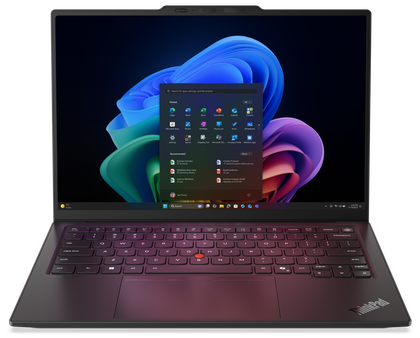
The Lenovo ThinkPad X1 Carbon has been the crown jewel of business laptops for years, and with the latest Gen 14 iteration, that hasn’t changed.
It’s a system that maintains its high repairability, great screen, excellent keyboard and I/O, and topped by a chassis that lives up to the ‘Carbon’ name. Intel Panther Lake’s excellent performance gives another reason to choose this business laptop above all the others, and it adds yet another layer to the premium feel that the X1 Carbon is known for.
I’m picky about laptops, especially ones that have a price tag as hefty as the X1 Carbon’s, but I can find very little wrong with this machine. The previous generation struggled with battery life, but that’s largely a non-issue with this generation. If you’re looking for a business laptop and price isn’t a concern, look no further.
About this review: Lenovo supplied a ThinkPad X1 Carbon Gen 14 unit for the purposes of review. It had no input into the contents of this article.


9/10
- CPU
-
Up to Intel Core Ultra X7 Series 3 processors
- GPU
-
Intel ARC 12Xe or Intel Integrated
- Display type
-
OLED
- Display (Size, Resolution)
-
14″ 2.8K (2880×1800)
- Beautiful 2.8K OLED display with VRR 120Hz
- Great performance for the size
- Excellent keyboard
- Great repairability
- Expensive
- No 4K display option
Lenovo ThinkPad X1 Carbon Gen 14 Aura Edition price and availability
The Lenovo ThinkPad X1 Carbon Gen 14 is available now on Lenovo’s website starting at $2,032. However, as is the case with other Lenovo laptops, I’d expect prices to fluctuate.
The entry-level spec includes an Intel Core Ultra 5 335, 256 GB PCIe Gen 4 SSD, and a 1920 x 1200 IPS touch display. The model Lenovo provided me for review came with an Intel Core Ultra 7 355, 512 GB PCIe Gen 4 SSD and a 2.8K non-touch OLED display. All other specs remained virtually the same, which included 32 GB of LPDDR5X at 8533MT/s.
The exact configuration I was sent doesn’t seem to be available as a preset option on Lenovo’s website, but if you were to use the site’s configurator to outfit it yourself, it’d cost you $2,255 at the time of writing.
- CPU
-
Up to Intel Core Ultra X7 Series 3 processors
- GPU
-
Intel ARC 12Xe or Intel Integrated
- Display type
-
OLED
- Display (Size, Resolution)
-
14″ 2.8K (2880×1800)
- RAM
-
Up to 64GB LPDDR5x 9600MT/s
- Storage
-
Up to 1TB PCIe Gen 4 NVMe SSD
- Battery
-
58Wh
- Ports
-
3x Thunderbolt 4, 1x USB-A 3.2, x1 HDMI 2.1, x1 Audio Jack 192k sampling
- Operating System
-
Windows 11 Pro
- Webcam
-
Up to 10MP with wide field of view and Immervision
- Wi-Fi connectivity
-
Wi-Fi 7
- Bluetooth
-
Bluetooth 5.4
- Dimensions
-
12.30 x 8.49 x 0.36/0.60 (front/rear), 0.69” (maximum)
- Weight
-
Starting at 0.977 kg (2.15 lbs)
- Colors
-
Black, Carbon Fiber (Top), Magnesium (Bottom)
A business laptop that feels great to use
The touch and feel of the X1 Carbon is still here
For those unfamiliar with the X1 Carbon, it earns that name by using Carbon Fiber as part of its construction. The top shell has it inside, while the main body of the chassis is magnesium, further lending itself to be as light as possible. Coming in at just 2.15 lbs (that’s a touch under a kilo for those of you outside the USA) it really does disappear into your bag, and for a laptop with a 14″ screen, that’s impressive.


Despite the conservative weight, you’re not giving up much in terms of I/O. There are a few small changes from the Gen 13 model: instead of two USB type A ports, you only get the one on the Gen 14, as it has been replaced by an additional Thunderbolt 4 port for a total of three. There’s a full-size HDMI 2.1 port and a headphone/microphone combo jack as well, which are standard on the X1 Carbon.

The keyboard hasn’t changed from previous X1 Carbon models, and that’s a good thing. The keys feel slightly less slick than the rest of the chassis, sport a 1.5mm travel and are backlit nicely. A standard arrow key layout is much appreciated, especially coming from the Yoga models that have the weird squished up-down arrow keys. Moving south of the keyboard, I do have a strong preference for haptic touchpads, and while they are a configuration option available for no extra cost, my unit didn’t come with one. That being said, I had zero issues using the standard touchpad.

The OLED on this thing is superb, and provides an excellent viewing experience in almost all light conditions. I found it a bit dim in a bright outdoor setting, but that’s par for the course with OLED. And finally: the 120hz refresh rate is dynamic! Hooray! This allows the Gen 14 to last a lot longer than its predecessor day-to-day while maintaining that buttery-smooth refresh rate.

4 things no one tells you about owning an OLED monitor
OLED monitors come with their own set of quirks.
Panther Lake is the gift that keeps giving
In the X1 Carbon format, it’s another excellent showing

So far, I’ve only had positive experiences with Intel’s latest mobile CPUs, and the Core Ultra 7 355 in the X1 Carbon is the same chip as what’s in the Yoga Slim 7i I reviewed just over a month ago. Here, it puts on another strong display.
ThinkPad X1 Carbon Gen 14 (Core Ultra 7 355) | Lenovo Yoga Slim 7i Ultra Aura Edition (Core Ultra 7 355) | ThinkPad X1 Carbon Gen 13 (Core Ultra 7 258V) | Lenovo Yoga 7a 2-in-1 (AMD Ryzen AI 7 445) | |
|---|---|---|---|---|
PCMark 10 (AC / Battery) | 8,011 / 7,899 | 8,020 / 7,650 | 7,056 / 7,101 | 6,686 / 6,007 |
Geekbench 6 (single / multi) | 2,610 / 11,263 | 2,542 / 11,166 | 2,711 / 10,963 | 2,577 / 10,544 |
Crossmark | 1,910 | 1,711 | 1,343 | |
Cinebench 2024 (single / multi) | 118 / 582 | 114 / 543 | 120 / 551 | 94 / 502 |
3DMark (Time Spy / Wild Life Extreme / Night Raid) | 3,330 / 5,578 / 30,537 | 3,256 / 5,541 / 30,019 | 3,978 / N/A / 32,429 | 1,855 / 3,041 / 19,578 |
In a business laptop that’s this thin and light, you get a great amount of performance. I will say, under load, the chassis does get quite warm. Both the bottom and top can reach a temperature that isn’t quite uncomfortable, but noticeable. The fans aren’t overly loud, and don’t reach a frequency that’s harsh to listen to.
You’re not going to be doing any heavy gaming on this machine, but the integrated graphics do perform admirably, pushing a playable framerate of 30 FPS in GTA V: Enhanced Edition and a much better 144+ in Rocket League. The latter is not the most difficult game to run, but being able to run it at stable numbers in excess of the refresh rate is great.
In regard to battery life, the previous generation X1 Carbon struggled to maintain all-day battery life, but the ability to enable VRR combined with the efficiency gains of Panther Lake on the latest model are promising changes on paper, and they play out well in reality. I could safely leave the charger at home and walk out the door without worrying about running out of juice, routinely getting 5-8 hours of screen-on time performing web-app tasks and some light productivity work with apps on-device. Even during late-night Football Manager sessions, I found myself not reaching for the charger as much as I thought I would.
The ThinkPad X1 Carbon is expensive — 3 reasons you’re better off with a ThinkPad T14
The latest ThinkPad X1 Carbon is an impressive but pricey work laptop. The T14 offers excellent value and more than enough performance for most users.
Strong repairability
A new frame gives even more freedom
ThinkPads have historically been great in regard to repairability, and the X1 Carbon Gen 14 is no different. Lenovo has redesigned the chassis and have called it a “Space Frame” design, which has allowed them to put components on both sides of the main board. This gives significant space savings, which doesn’t just allow for better cooling, but also makes it easier to service. iFixit, the industry leader in consumer device repair and known for championing right-to-repair laws, gave the X1 Carbon Gen 14 a 9/10 Repairability Score, which says a lot.
Opening the bottom part of the chassis only requires removing 4 screws, and you get complete access to the hardware underneath. For a laptop in this form factor, it’s definitely impressive.
Framework says its new modular Laptop 13 Pro is a “ground up redesign”
The modular PC company has also refreshed its Laptop 16 and revealed its new Wireless Touchpad Keyboard.
Should you buy the Lenovo ThinkPad X1 Carbon Gen 14 Aura Edition?
You should buy the Lenovo ThinkPad X1 Carbon Gen 14 Aura Edition if:
- You want a business laptop with no compromises
- You need a lightweight laptop that still has some horsepower
- You want your laptop to be repairable
You should NOT buy a Lenovo ThinkPad X1 Carbon Gen 14 Aura Edition if:
- You’re on a budget
- You want a laptop with strong graphics capabilities
The Lenovo ThinkPad X1 Carbon Gen 14 Aura Edition is an excellent laptop. If you’re a fan of ThinkPads, you’ll undoubtedly be a fan of this one. They’ve only continued to improve upon what is already a great formula: a lightweight chassis, great performance, a superb typing experience, a screen that’s easy on the eyes, now with better battery life and a boost to performance thanks to Panther Lake.
9/10
- CPU
-
Up to Intel Core Ultra X7 Series 3 processors
- GPU
-
Intel ARC 12Xe or Intel Integrated
