

Summary
- Tux just turned 30 and remains the definitive face of Linux.
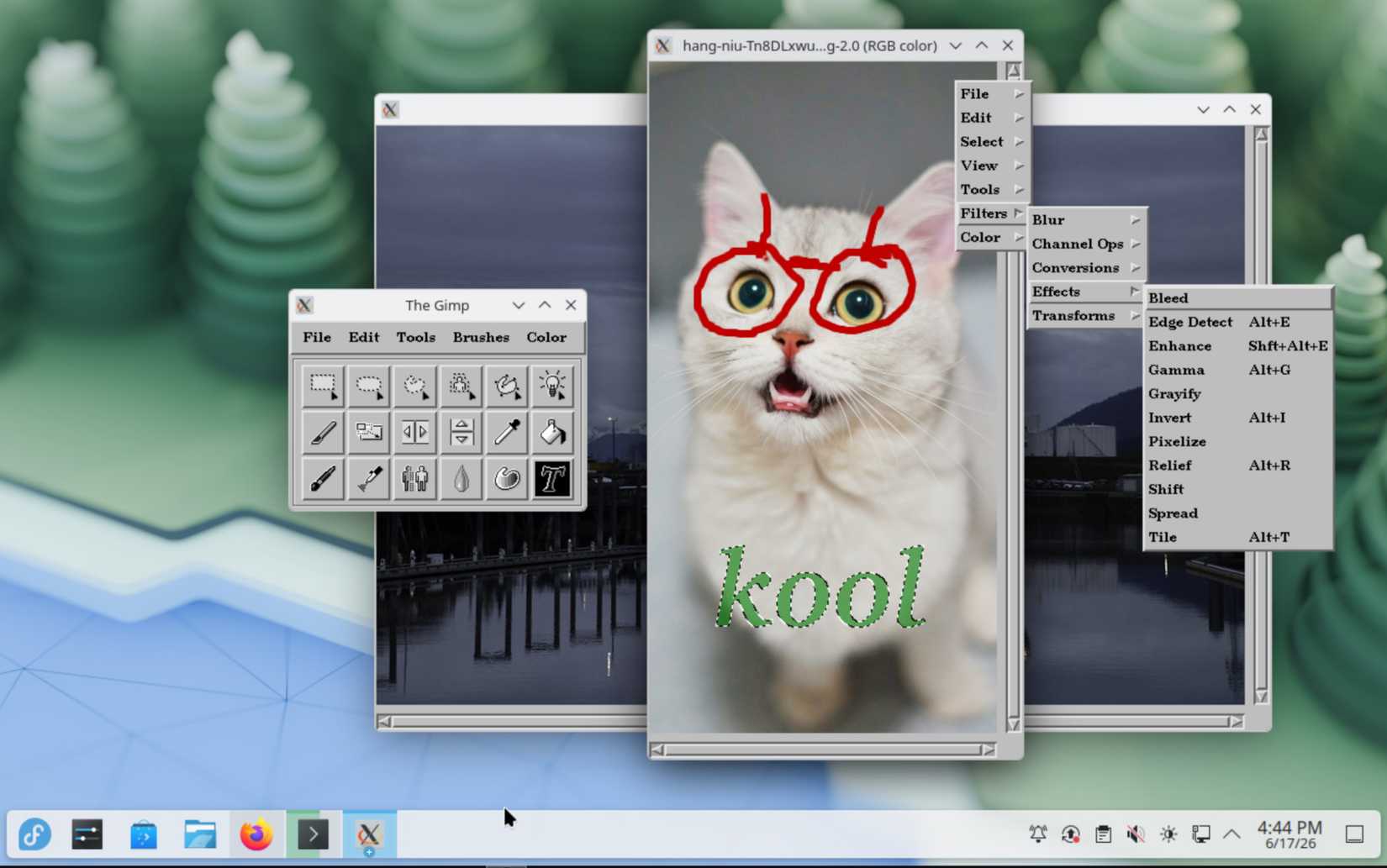
- GIMP 0.54—the 1996 build used to create Tux—is now available as a Flatpak with bundled dependencies.
- Install from GitLab or run ‘flatpak install –user gimp-0.54.1-8.flatpak’ to draw like it’s 1996.
Tux the Penguin is the face of Linux. There’s no debate, really; he’s not just a popular icon, he’s not just a cool mascot, he’s the face of Linux. He has been around for a long time now; in fact, he just celebrated his 30th birthday last month. But not many people know how Tux came to be.
Well, if you wanted to make a digital pilgrimage to the birthplace of Tux, someone has just made it possible in Flatpak form. The three-decade-old GIMP 0.54 has reappeared on the internet, and now you can draw like it’s 1996.
GIMP 0.54 re-emerges on Linux as a modern-day Flatpak
You can download it right now

As spotted by Linuxiac, GNOME developer balooii has released a Flatpak version of GIMP 0.54. Because it’s a Flatpak, all the dependencies are bundled within the package, meaning you don’t need to do any finagling to get the 30-year-old app working on your modern-day PC.
It’s really cool to give the 90s version of one of Linux’s best image editors a spin, but GIMP 0.54 is more than just an old build. As per Tux’s designer’s notes, it’s also the version they used to make the penguin:
All of the penguin pictures were created entirely within The GIMP (version 0.54). The majority of the drawing was done on my 486 DX2/50 running linux. I used nothing but a mouse and a lot of patience. The final smoothing was done on an SGI Crimson (also using the GIMP) only because my home machine has an 8-bit display.
Yes, this was back when it was called “The GIMP.” I guess the app grew out of that phase. If you want to try drawing your own Tux, head over to the GIMP 0.54 GitLab page, or type “flatpak install –user gimp-0.54.1-8.flatpak” into your terminal.
These 7 Linux myths you still believe simply aren’t true
Linux is a completely different beast than it was a decade ago.
